
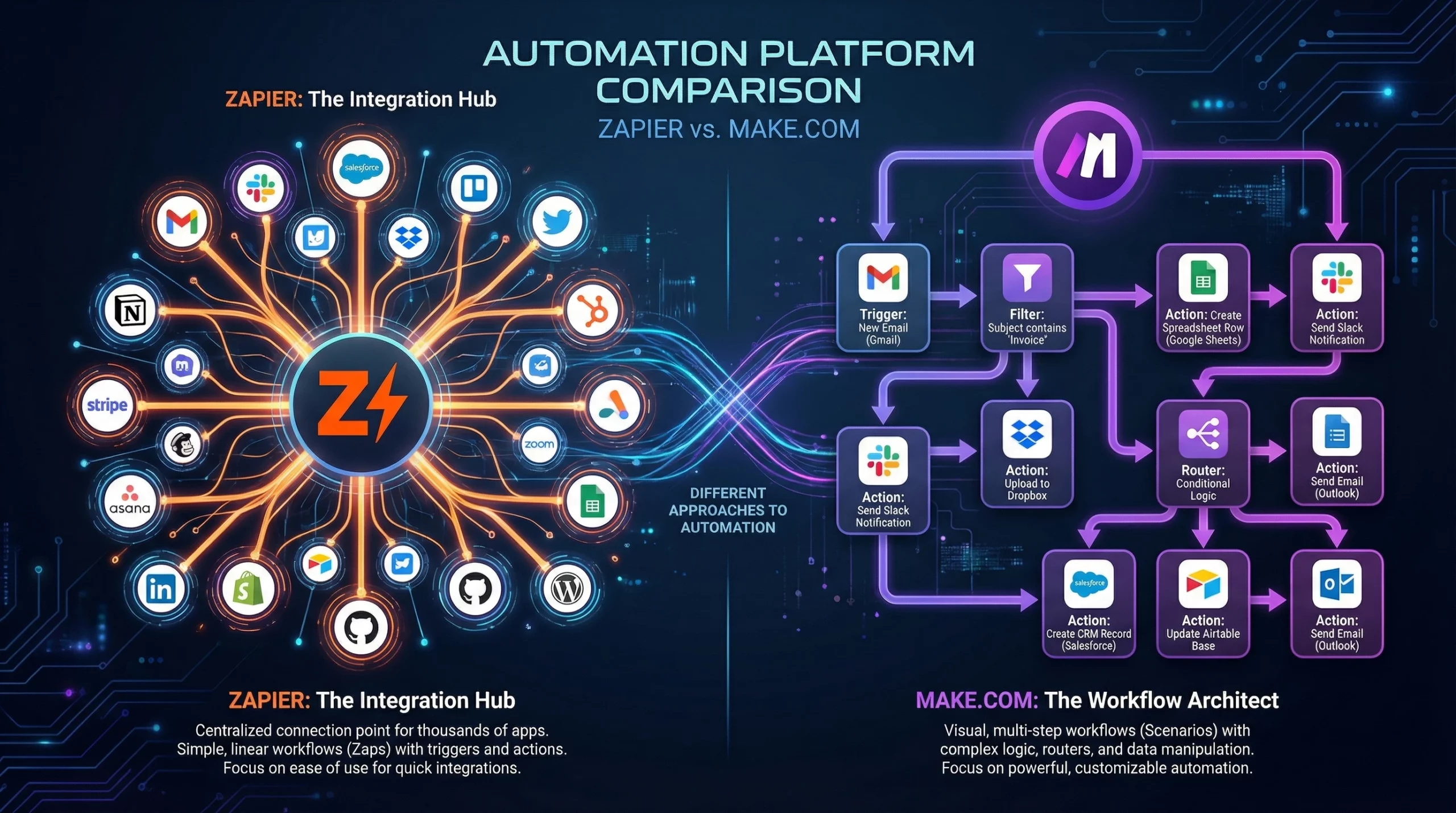
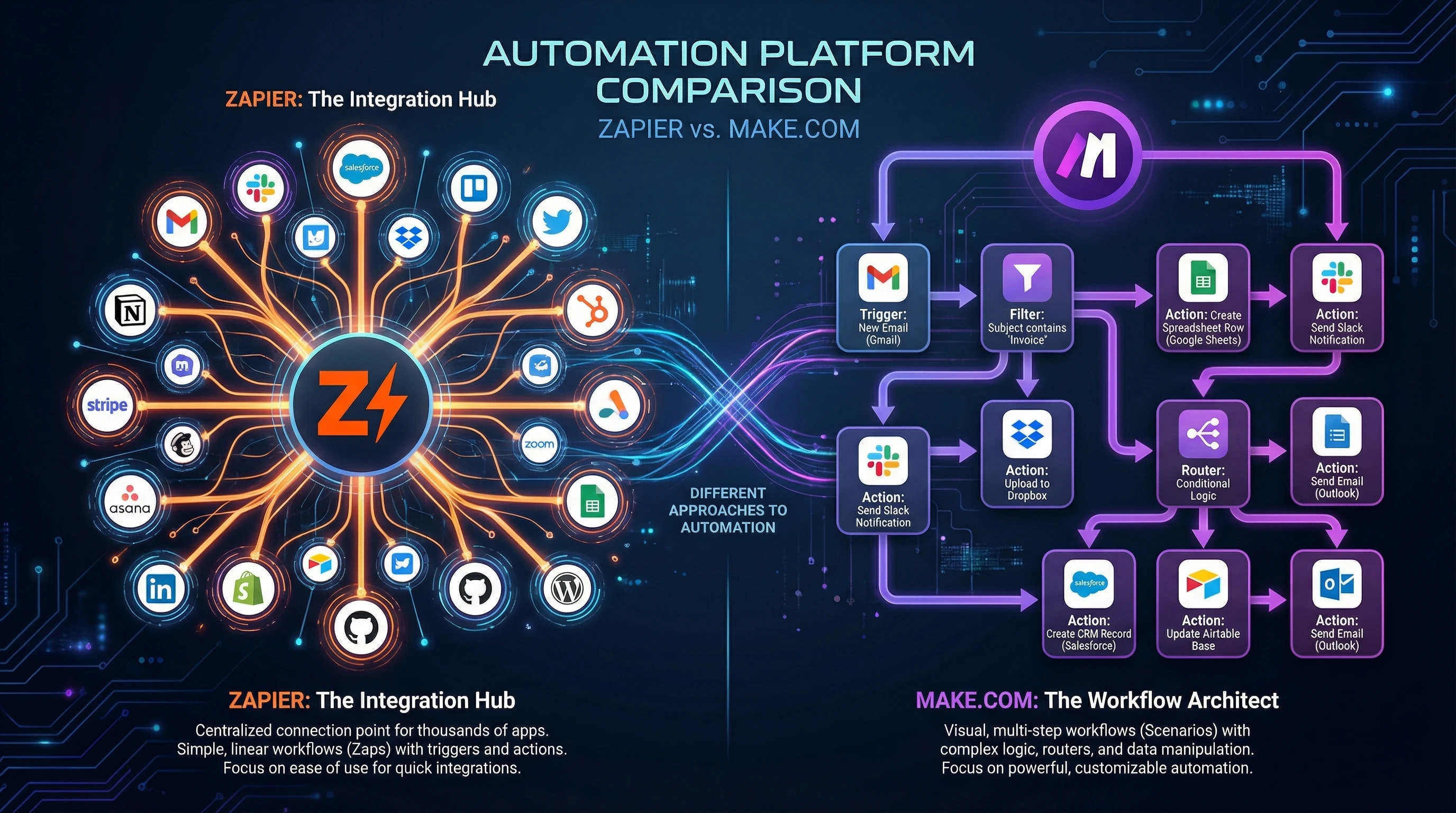
If you’ve been using automation tools for a while, you’ve probably relied on Zapier as your goto solution. Zapier has the most integrations and makes it really easy to string your apps together. But recently, Make.com (formerly Integromat) has caught the attention of more advanced users. When I first tried Make, I quickly saw how it can tackle more complex workflows, and often for a lot less money. So, is it time to consider switching, especially for 2026 and beyond? Here’s my honest perspective after using both for serious daytoday automation.
The Switching Dilemma: Zapier or Make in 2026?
Zapier set the standard for automation, making it super easy to link actions across 8,000+ apps. It’s the most familiar tool for beginners or anyone who just needs things to work fast. Make.com, on the other hand, has positioned itself as the powerhouse for people who want to build more complex, visual workflows and don’t mind a learning curve. Deciding whether to switch often depends on what you need from your automations, and how much you’re spending every month.
Zapier vs. Make.com: Quick Comparison Table
| Platform | Interface Style | Integrations | Best For |
|---|---|---|---|
| Zapier | Linear, step by step | 8,000+ apps | Beginners, quick builds |
| Make.com | Visual drag and drop (Canvas) | 3,000+ apps | Complex logic, cheaper at scale |
The Interface: Step by Step vs. Visual Canvas
How Zapier Works
Zapier handles everything as a straight line. Each trigger leads to one or more actions, with the occasional filter or condition. This approach is easy to learn, and I’ve set up simple Zaps in just a few minutes. But as soon as you need to do something more complex, like sending different responses for multiple branches or looping through a list of items, it can get clunky.
How Make.com Works
Make uses a drag and drop visual canvas, so you can see your whole automation laid out at once. This makes it easier to follow complex paths with routers (for branching) and iterators (for looping through lists or line items). At first, I found Make harder to get used to. The interface feels more like wireframing a flowchart than building a simple recipe. But after a few real projects, such as splitting up a bulk order into multiple invoices or updating multiple tools at once, I started to see where Make really shines.
- Zapier is really good for straightforward “if this, then that” automations, for example: new lead → create contact → send email.
- Make is better when I need my workflow to split into several paths or handle a batch of items in one go.
Pricing: Which Tool Gives Better Value in 2026?
Understanding Zapier vs Make Pricing
This area is super important for almost everyone I’ve talked to. If you’re automating a bunch of actions or dealing with lots of data, pricing can quickly become the dealbreaker.
- Zapier: Pricing is based on how many tasks you run each month. Once you go above the basic plan, the monthly bill can add up fast. Zapier’s higher tiers give you more features, but costs grow with every extra task.
- Make.com: Make.com packages are much better for highvolume users. Instead of charging per task, Make gives you a generous operations quota (number of “steps” in your scenarios) that goes a lot further, often three to four times the action count for the same money. For heavy users, billing is almost always lower.
The “Bill Threshold” Rule
One rule I recommend: if your Zapier subscription is pushing $50/month or more, switching to Make usually pays for itself within a month or two. For smaller users, the savings might not matter as much. But once you’re automating larger parts of your business, the price gap really stands out.
Comparing Free Plans: Make vs Zapier Free Plan
- Zapier’s free plan lets you build singlestep automations with a limited number each month. Enough for quick tasks, too limited for most businesses.
- Make’s free plan is more generous. You can create multistep automations, try out routers and iterators, and even run up to 1,000 operations a month before paying anything.
AI & Features in 2026: What’s New?
Zapier: AI Agents, Copilot, and Advanced Tables
In 2026, Zapier has gone allin on features for nontechnical users. Their new AI Agents can make decisions or handle simple tasks automatically, while Copilot helps walk you through workflow building in plain language. Zapier Tables now act like mini databases with builtin automations on top, which is great for small businesses tracking simple pipelines.
- Zapier AI can analyze incoming data, route tasks based on a conversation, and even generate replies to leads automatically.
- The Copilot builder lets me just describe an automation, and it suggests a setup. This is great for people who hate technical details or just want to move fast.
Make.com: Advanced Data Handling and API Integrations
Where Make really wins is processing complex, messy data. When I need to loop over line items, like invoice elements, split up bulk CSV data, or run custom API requests to less common tools, Make’s visual modules and builtin functions do the trick. Using routers and iterators, I can build complex branching paths without writing any code.
- Make handles arrays, data cleaning, and rerouting in a way that Zapier just can’t match without tons of addons.
- Advanced modules for HTTP and Webhooks make it easy to connect with almost anything, even if it’s not in Make’s app library.
Who Should Switch (and Who Shouldn’t)?
Stick With Zapier If:
- You want the fastest, easiest setup, and you stay within the simple “if this, then that” structure.
- Your favorite app is in Zapier’s list of 8,000+ integrations, but not on Make’s smaller list.
- You rely on readymade templates, basic triggers, and don’t need branching or looping.
- You like having advanced AI help to set up new automations quickly.
Move to Make If:
- You regularly need to split workflows into several paths, such as multiple approval steps or different outcomes based on data.
- You process line items, for example, parsing shopping carts or invoice items in bulk instead of one by one.
- You want to save money at scale, especially if you’re running more than 2,000 tasks a month.
- You or your team know how to plan a workflow visually and don’t mind spending a bit of time learning the interface.
What About n8n? Privacy & SelfHosting Options
If you have special privacy needs or want to keep your automations inhouse, it’s worth considering n8n. I’ve run it on my own server to make sure no data leaves my company’s control, and it gives me a lot more freedom. It’s open source and has strong community support, but you’ll need to handle updates and hosting yourself. If data compliance or full customization is really important in your business, n8n becomes a real alternative to both Zapier and Make.
My Final Take: Zapier vs. Make in 2026
I use both Zapier and Make for my consulting clients. When someone just wants a few basics automated and needs it set up fast, Zapier wins. When they’re running a business that’s outgrown linear automations or their Zapier bill has gotten out of hand, I show them Make. It can handle more complex projects, cuts costs for highvolume users, and the visual builder is great for mapping out big ideas.
If you’re happy with your simple Zaps and the price isn’t a concern, you can keep using Zapier’s wellsupported platform, and benefit from the new AI tools, too. If you feel boxed in by task limits or simple workflows, or you know your bill is heading north, Make is really worth a close look. For anyone focused on privacy or looking to selfhost, n8n is an option, but only if you’re ready for some tech work on your own.
Switching always means spending some time learning new tools and rebuilding key workflows. But based on what I’ve seen (and the money I’ve saved clients), the payoff from moving to Make can be pretty good, especially for anyone scaling their automations in 2026. If you’re on the fence, try building one of your more complex automations in both tools to see which feels best. You might be surprised how much flexibility you didn’t realize you needed.
Want to dig deeper into automation platforms or have more questions? Ask in the comments below, and I’ll share more detailed examples or help you figure out what’s right for your setup in 2026!
Make sounds great, but I think that a lot of people will stick with Zapier, as that is what they know and have been working on. However if you look at the pricing, Make may make more sense if you have a lot of actions to perform each month and you don’t want to be charged extra.
I see Make only integrates 3000 apps while Zappier allows for a lot more. Do you think this will make a difference in user preference. It will be interesting to see if people use their full quota here as it does sound like an awful lot of apps.
You raised a great point about the ‘full quota’ of apps. Most people only ever use 5 to 10 apps in their entire business, so having 8,000 options is often just ‘marketing’ rather than a daily necessity.
In my opinion, the real ‘preference’ shift isn’t just about price or apps—it’s about the Visual Builder. Make’s canvas looks like a map, which is much easier for some people to troubleshoot than Zapier’s long, vertical list.
Question for you: Do you find it easier to ‘see’ a workflow as a flowchart (like Make) or as a step-by-step checklist (like Zapier)? I think that is what will eventually decide which tool people stick with.
Hi, don’t really know much about Make but Zapier I used before for autoposting and for something to do with mail chimp. I can’t remember what it was now but may need to look back into it again for my current set up. Do you know if any of them work with Systeme.io? I have a download blog post as pdf lead capture from promote labs and thinking if I can set this up so it links to my autoresponder.
Really helpful breakdown — especially the “bill threshold” idea and the way you explained tasks (Zapier) vs operations (Make). Quick question: if someone has a handful of multi-step Zaps running daily (with filters/paths), what’s your simplest way to estimate the equivalent operation count in Make before rebuilding everything? And when you help clients switch, do you usually migrate one “high-cost” workflow first (to prove savings) or do a full move all at once?