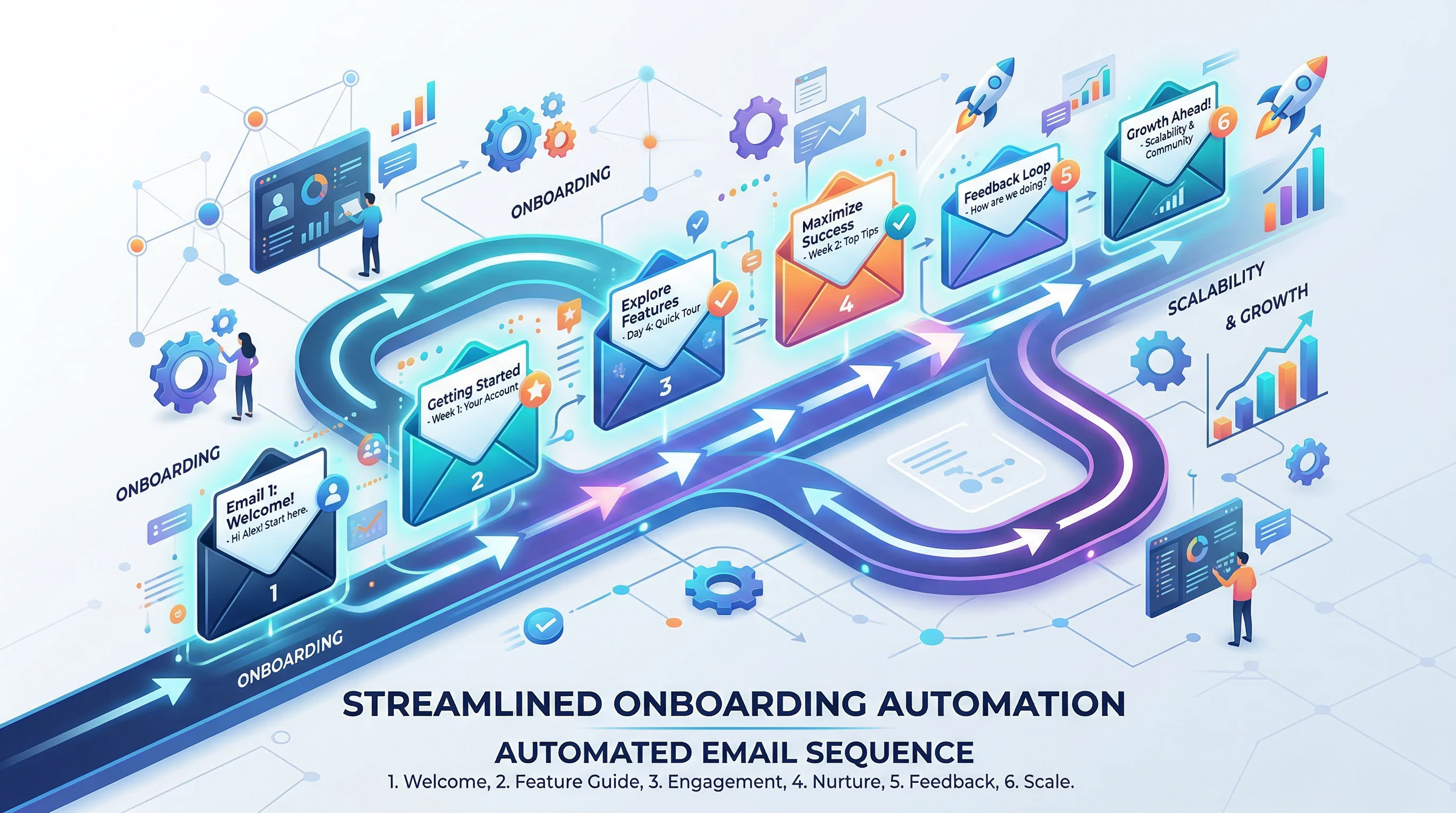
Email onboarding is one of those strategies that can feel overwhelming when trying to scale. I remember starting out and building every welcome sequence from scratch. When the subscriber list was small, this hands-on, personal touch worked well. But as my business grew, repeating personalized emails for every user move became impossible. That’s when I realized how much value comes from using templates and automation tools in my onboarding process.
Here’s my straight-up rating and quick-glance details for this approach to scaling onboarding emails:
Approach Name: Onboarding Email Automation & Templates
Best For: Growing businesses, SaaS products, online courses, and eCommerce
Price Range: Free (using basic tools) to $40/month+ (advanced automation platforms)
Core Tools Mentioned: Mailchimp, ActiveCampaign, HubSpot, ConvertKit, Zapier
Personal Experience: 5 years using and optimizing automated email onboarding for client and personal projects
Reliability Rating: 4.8/5
User Satisfaction: 4.7/5
Template Quality: 5/5
Support from Platforms: 5/5
Benefits for Scaling: 5/5
Community and Resources: 4.6/5
Free Resources: YES. I’ve included some free templates below you can adapt right now.
I’ve tested quite a few onboarding flows in different industries. Using templates and the right automation lets me spend less time crafting individual emails, and more time improving the entire user adventure. If you want to move past the initial launch and actually grow, you need an approach that’s quick to set up, easy to improve, and won’t hold you back when things speed up.
I started with simple automations on Mailchimp, and over the years I moved to more powerful platforms as the needs of my projects expanded. All these options share one thing; they make managing and improving onboarding emails way easier, so you don’t lose that personal feel even when thousands of subscribers are joining each month.
Meet the Writer and My Process
I’m someone who enjoys seeing how automated systems can help people instead of turning them into faceless numbers. Most of my projects involve building or optimizing email onboarding, especially for early stage SaaS and creators with online education products. I tested and adjusted hundreds of onboarding templates, and worked with teams to measure what works and what falls flat.
When I first tried using a cut and paste template in my own SaaS onboarding, I noticed completion rates jumped almost 20%. By mixing personal touches with automated triggers, I’ve helped businesses grow faster and smoother without customer complaints about “robotic” messages.
My main goal is always to create real value and help users succeed from their first interaction. If you want more out of your onboarding emails and your team’s time, I’m happy to share tips, templates, and my honest review of what matters most.
You’re always welcome to reach out and ask for direct advice if you hit a snag in your sequencing or setup. I always do my best to reply quickly, especially if you’re knee deep in an automation tangle.
Why Onboarding Emails Matter (and Why Scaling Gets Complicated)
An onboarding email sequence is not just your handshake with a new customer; it’s often their main guide for using your product or service. When I rolled out my first onboarding sequence, the welcome email alone doubled my new customer engagement. But as more people signed up, it became tougher to keep this experience feeling personal and consistent. The wrong move or missing message led to frustrated users and cancellations.
Keeping up was impossible without automation. Manual sends left gaps, inconsistent follow ups, and nights where I was stuck in my inbox instead of building my business. Once I moved to automated templates, not only did my life get easier, but feedback from customers improved too.
What makes onboarding so important isn’t just the act of sending a few emails—it’s the structure that introduces people to your value. Whether it’s an app, course, or online shop, your sequence needs to:
- Make the first impression count
- Guide users to their first success
- Preempt common issues
- Set expectations for the next steps
- Sort messages based on actual user behavior
A well built onboarding flow helps customers use your product better, renew or upgrade, and recommend you to others. But when you manually edit or send each message, human error or delays creep in. I learned this the hard way after missing a follow up and losing a big customer that could have become a loyal advocate.
Automation became the true fix for these issues. By combining solid templates with trigger based automations, I regained control and scaled up without sacrificing quality. I still review key messages regularly, but now my time is spent on improvements, not inbox triage.
How Onboarding Email Templates Work for Scaling
Email templates form the structure for each stage of your onboarding. Instead of starting from scratch, I use proven models that have clear language and layouts, but are flexible enough to personalize.
Templates are not meant to be boring. Instead, they free you from reinventing the wheel and help guarantee that no key message gets missed. When you have a clear template for your “Welcome,” “Getting Started,” “First Win,” and “Check In” messages, you can automate almost everything.
Here’s how I use templates to make onboarding emails easier to manage at scale:
- I create a core set of onboarding email templates, each designed for a specific user milestone or challenge.
- Each template has placeholders for details like user name, product features, or unique benefits, so my automation tool fills in these specific details automatically.
- Automation rules pick the right template and send it at the exact moment a user performs an action (like signing up or hitting their first milestone).
- Templates can be tested and tweaked over time, letting me run A/B tests or improve copy easily without rebuilding everything.
This approach lets you deliver consistent, helpful onboarding even as your audience grows into the thousands.
The Essential Onboarding Email Types You Need
I recommend starting with a small set of email types that cover the most important stages in your onboarding adventure. Over time, you can add or tune messages as you learn more about your users.
Here is my go-to list of onboarding email templates, along with when I use them and what I include in each:
Welcome Email
This is the first message your new subscriber receives. I keep it simple and genuine, thanking them for signing up and reminding them of the main benefit they’ll get. A short line about next steps can reduce first day confusion and make users feel good about joining.
What I include:
- A warm introduction (from a real team member, if possible)
- Reminder of the sign up benefit
- A single action to get started (click a link, explore dashboard, join an event)
- Support contact in case they get stuck
Getting Started Guide
This message appears after the welcome, triggered a day or two later. Here, I break down the first actions users should take to see value quickly.
What I include:
- A checklist or bullet list of first steps
- Short video or tutorial link showing those steps
- FAQ or help resource link
- Personal story of success (can help with motivation)
First Milestone Celebration
People need to feel successful early, so I set automation rules that send this message when a user completes their first key task. It could be uploading a profile photo, finishing a lesson, or making a first purchase.
What I include:
- Recognition of their accomplishment
- Quick overview of next steps
- Encouragement to share feedback or reply with questions
Problem Prevention Email
This is one of the less used templates that makes a big difference. I review past data or support tickets, and whenever I notice a common user mistake or roadblock, I build an email that appears just before the risk point.
What I include:
- Heads up about a common issue
- Simple step by step fix or prevention tip
- Support contacts for fast help
Check In and Feedback Request
After users are a week or so into their adventure, I send a check in email. This gathers feedback, shows you care, and gives you a chance to get ahead of any frustration.
What I include:
- Short question about their progress
- Simple “Did you get stuck?” prompt
- Open invitation to reply directly
- Survey link if you want scalable feedback
Upgrade or Next Product Push (Optional)
After a user hits their goal, I use this message to show the next level or an upgrade path. It’s important to focus on value and timing, not just sales.
What I include:
- Congrats on progress (personalized to the action taken)
- What’s new or advanced that fits their needs
- Clear call to action with a benefit
Templates You Can Use Right Now
I’m including a few generic onboarding templates you can copy and adjust for your own business. Each one is designed for fast editing and easy automation with almost any modern email tool.
Welcome Email Template
Subject: Welcome to [Your Product Name]!
Hi [First Name],
Thanks for signing up for [Product Name]. I’m really glad you’re here. Your new account is now ready, and you can log in any time to get started.
If you need help at any point, reply to this email or check our help center [link].
Here’s to your success,
[Your Name or Support Team]
Getting Started Guide Template
Subject: Let’s Set Up Your [Product Name] Account
Hi [First Name],
Your account is all set! Here’s a quick list to make the most of your membership on day one:
- Do [Action 1]
- Try [Action 2]
- Watch our quick start video [link]
If you have questions, just hit reply.
Cheers,
[Your Name]
Milestone Celebration Template
Subject: Nice Work! You’ve Completed [Milestone]
Hi [First Name],
I just saw you [Completed Milestone]. That’s a big step. If you want the fastest route to your next goal, here’s what I recommend you do next:
- [Next Step 1]
- [Next Step 2]
If you have feedback or questions, simply reply to this email. I’d love to hear how you’re liking [Product Name].
Thanks,
[Your Name]
Problem Prevention Email Template
Subject: Avoid this Common [Product] Roadblock
Hey [First Name],
Some new users run into trouble with [Common Issue]. If this happens to you, here’s the simple fix:
- [Quick Fix Instructions]
Of course, my support team is here any time if you need help.
[Your Name]
Automation Tools and How I Use Them to Scale
Automation tools are what make scaling these templates possible. I’ve tried at least half a dozen email platforms, from free ones for small projects to enterprise options for bigger brands. Each has strengths in different scenarios, but the goal is the same. Set up trigger events and have each template sent right when it’s needed, no matter how many users are flowing in that day.
Top Platforms for Automated Onboarding Emails:
- Mailchimp: Great for beginners and small businesses. Offers basic email automations, supports templates, and connects with most websites easily.
- ActiveCampaign: My top choice for complex onboarding. Lets me trigger emails based on actions, tags, or custom data. Visual builder is easy to use, and I can split test sequences to see what performs best.
- HubSpot: Powerful when you want integration with your sales or support processes. Free plan works for small lists, and templates can get highly personalized with user data.
- ConvertKit: Built for creators and online educators. Visual automation tools, tagging, and modular templates make onboarding easy and personal, even as lists grow.
- Zapier: Not an email tool itself, but I use it to connect forms, product signups, or webinars to trigger the right onboarding emails in other platforms.
Key Automation Features I Rely On:
- Trigger Events: Send a message based on the action, not just a time delay. For example, welcome emails right after signup, milestone messages after a completed task.
- Audience Segmentation: I group users by source, interest, or behavior so each onboarding path is tailored. This keeps emails relevant at scale.
- A/B Testing: Most tools let me test subject lines, CTAs, or even different versions of emails to see which works best.
- Personalization Tags: I use placeholders like [First Name], [Goal], or [Feature Used] so emails feel like they’re meant just for the recipient.
My Simple 3 Step Automation Setup:
- Draft or copy templates for each onboarding milestone
- Use platform triggers to send the right template at the right time or event
- Monitor open and click rates and user replies, then improve templates and triggers accordingly
Best Practices for Scaling Without Losing Your Personal Touch
Scaling does not mean things have to feel robotic. Here’s what I do to keep automated onboarding feeling helpful and authentic:
- Use the sender’s real name and email. I avoid generic “noreply” email addresses. This encourages real conversation.
- Review and update templates regularly. I update my onboarding emails at least every quarter based on feedback and analytics.
- Monitor replies closely. Even a simple auto response saying “Thanks for your note, I’ll get back to you soon.” works better than silence. For all user replies, I try to respond in 24 hours.
- Test tone and content. Especially with new audiences, I’ve learned that minor tweaks to language can double engagement rates.
- Personalize by activity, not just name. Templates should mention actions the user has taken or missed, so each message reinforces progress or offers support where it’s needed most.
When my onboarding flow sounds like me and actually helps users move forward, I see more users stick around and reach their goals.
Advanced Tips for Improving and Measuring Automated Email Onboarding
Once your templates and basic automations are running, optimizing results is all about data and feedback. I check these areas regularly to keep improvements rolling:
Analyze and Adjust Based on These Metrics
- Open Rates: Shows which subjects and timing actually get noticed.
- Click Rates: Reveals if people take the actions you recommend.
- Churn or Drop Off Points: Pinpoints where users stop responding or disengage. This often highlights where a new or revised email is needed.
- Direct Replies: Unfiltered feedback often shows technical problems or confusion you might miss otherwise.
How I Run Ongoing A/B Tests
- Change only one element at a time (subject, call to action, content block)
- Track results for at least 500+ sends to get reliable data
- Apply what works to all new audience segments
Collect Qualitative Feedback While Scaling
- Add a quick survey link in your check in email
- Invite users to reply with suggestions: “Reply and tell me your biggest challenge, we read every message.”
- Watch for patterns in negative replies, then build a prevention email to address that issue in the future
Maintain List Health and Deliverability
As your onboarding audience grows, you need to keep your list clean. Regularly remove bounced emails, monitor for spam complaints, and avoid spammy phrases or too many links. Healthy lists keep emails out of the junk folder and ensure your sequences actually reach new users.
Recommended Reading and Resources
If you want more info, a few sources have helped me over the years:
- Really Good Emails – Eye-catching real life onboarding examples for almost every use case
- ActiveCampaign Customer Stories – Helpful walkthroughs showing advanced automation in action
- Zapier’s Learning Center – Excellent for connecting tools and creating flexible onboarding automations
Pushing Your Onboarding Beyond Basic Automation
After you set up your onboarding basics, it’s worth looking into more advanced flows that adapt to individual behavior. Here’s how I’ve expanded onboarding for stronger results:
- User Based Triggers: For SaaS, I target emails based on how far users have gotten in setup. Slow starters get more help, fast movers get an accelerated track.
- Segmenting by Source: I send different onboarding sequences to users who sign up from a webinar, Facebook ad, or organic search. Source based tailoring raises conversion rates.
- Progressive Profiling: Instead of asking for all info up front, I use each email to gather one new detail. By the end of the sequence, I know more about each user and can send super targeted upsells or success stories.
- Reengagement Flows: If someone stalls or misses a milestone, I set up win back emails. A helpful nudge or offer often brings people back who might have been lost otherwise.
- Integration with Customer Support: Some tools (like HubSpot or Intercom) let onboarding emails trigger support tickets or reminders, so no one falls through the cracks.
Common Mistakes and How I Avoid Them
Through testing and a few painful failures, I’ve spotted mistakes that can ruin an otherwise good automated sequence. Here are issues I try to avoid, with tips from my personal experience.
- Sending emails too fast or too slow: I match sending pace to the user’s real activity, not just a fixed calendar. I check engagement stats to spot pacing issues and adjust triggers as needed.
- Overwhelming new users: I avoid sending too many emails in the first week. Users appreciate space to explore, with timely, relevant check ins instead of daily “reminders.”
- Ignoring replies: If someone replies and gets silence or generic auto replies, trust drops fast. I make sure every real user reply gets a personal response.
- Forgetting to test on mobile: Over half of users open onboarding emails on their phone. I preview every template on a small screen and keep calls to action big and clear.
- Overpersonalizing details: Using too much fake personalization (“I see you love dogs!” from nothing but a signup email) feels creepy and forced. I stick to what the user has told me or done, not guesses based on bad data.
My Final Thoughts on Scaling Onboarding Emails
I believe onboarding email automation and templates are essential for growing any online business or product. By creating great templates, using smart automation, and regularly improving your sequences, you can help every new user feel welcomed and supported, even as your audience doubles or triples.
From my own experience, the best results come from a mix of structured templates and personal touches. Don’t be afraid to test, tweak, and occasionally ask your users what would help them most.
If you want to get started, I always recommend copying the templates above, setting up basic automations (even in a free tool like Mailchimp), and focusing on real feedback loops. You’ll see results that free up your time and delight your newest customers.
I’m always open to sharing advice or reviewing onboarding flows. If you run into any issues or want more templates, connect with me through my blog or reply to this article; I try to answer everyone within a day or two. Good luck making onboarding work for your business, and don’t let scaling slow you down!
If you have a question about onboarding automation or need help with template writing, drop your comment below or email me directly. I’m happy to help, share more examples, or point you toward helpful resources. Enjoy building a smoother workflow for you and your customers!