Marketing automation SaaS (Software as a Service) has become a cornerstone in many marketing teams’ toolkits, and for good reason. I use these platforms daily to save time, improve consistency, and create smoother experiences for my business and my customers. If you’re wondering whether marketing automation SaaS is a good match for your business, or you’re just curious about what it actually brings to the table, let me help you sort through the most valuable advantages I’ve found over years of hands-on experience.
What Is Marketing Automation SaaS?
At its core, marketing automation SaaS is cloudbased software that takes care of repetitive marketing tasks on your behalf. This can include things like scheduling social posts, sending email blasts, nurturing leads, producing analytics reports, and more. Instead of logging into multiple services or carefully scheduling every email by hand, I can set up workflows once and the software works in the background. Many SaaS solutions have simple draganddrop editors, easytouse templates, and builtin analytics dashboards; you don’t need a tech background or expensive hardware to put powerful marketing tools to work for you.
For new users, here are the essentials about marketing automation SaaS:
- Userfriendly Interface: Most tools make it simple to build campaigns, even without a technical background.
- Cloud Access: I can work from anywhere with an internet connection, which is great for remote or global teams.
- SubscriptionBased Pricing: Payments are usually monthly or yearly, which is easy on the budget. Updates show up automatically, so you always have the most up-to-date features available.
Core Advantages of Marketing Automation SaaS
Using marketing automation SaaS has transformed the way I build campaigns and interact with customers. Here are the most practical benefits I notice every single day:
- Efficiency and Time Savings: Routine actions like sending automatic followups, sorting leads, or organizing lists all happen on their own. This leaves me free to focus on big picture strategy instead of endless busywork.
- Consistency Across Channels: Automated schedules and templates mean my brand message stays solid across email, socials, ads, and web content. Customers get a steady and familiar experience.
- Personalization at Scale: I can create unique paths for different customer types with just a few taps, using datadriven triggers and built-in segmentation tools.
- DataDriven Decisions: Realtime analytics dashboards show instantly what’s working and what needs attention. I’m able to make smart adjustments and double down on winners without guessing.
- Easy Integration: Most SaaS platforms (like ActiveCampaign or GoHighLevel) plug right into popular CRMs, customer databases, and ecommerce solutions, syncing data without manual effort for a streamlined workflow and up-to-date information.
Why Upgrading Beyond Free Tools Is Crucial
In my early days, I relied heavily on every “free” plan I could find, like Zapier or the basic tier of Mailchimp. Free options are appealing when funds are tight or when you’re just trying out ideas. Still, when I got more serious about scaling up, I ran smack into tight limits—be it low send quotas, not enough integrations, weak automation features, or missing analytics functions.
One time, I lost an entire weekend to a stubborn workflow trigger that just wasn’t supported by a free tool. Had I sprung for the paid version, I could have saved both time and lost revenue. Free options are helpful for testing or super lean startups, but they’ll usually block your progress before long. You need things like advanced reporting, complex workflow builders, and responsive support as your marketing grows.
Picking the right time to level up ensures you won’t face headaches as you expand. Plenty of pro plans are affordable and unlock more of the benefits automation has to offer. I always look for platforms that suit me now but can scale alongside my business later.
Jumping Into Marketing Automation SaaS
Getting into automation for the first time can feel overwhelming. My advice: start with the basics, then expand gradually as you get more comfortable.
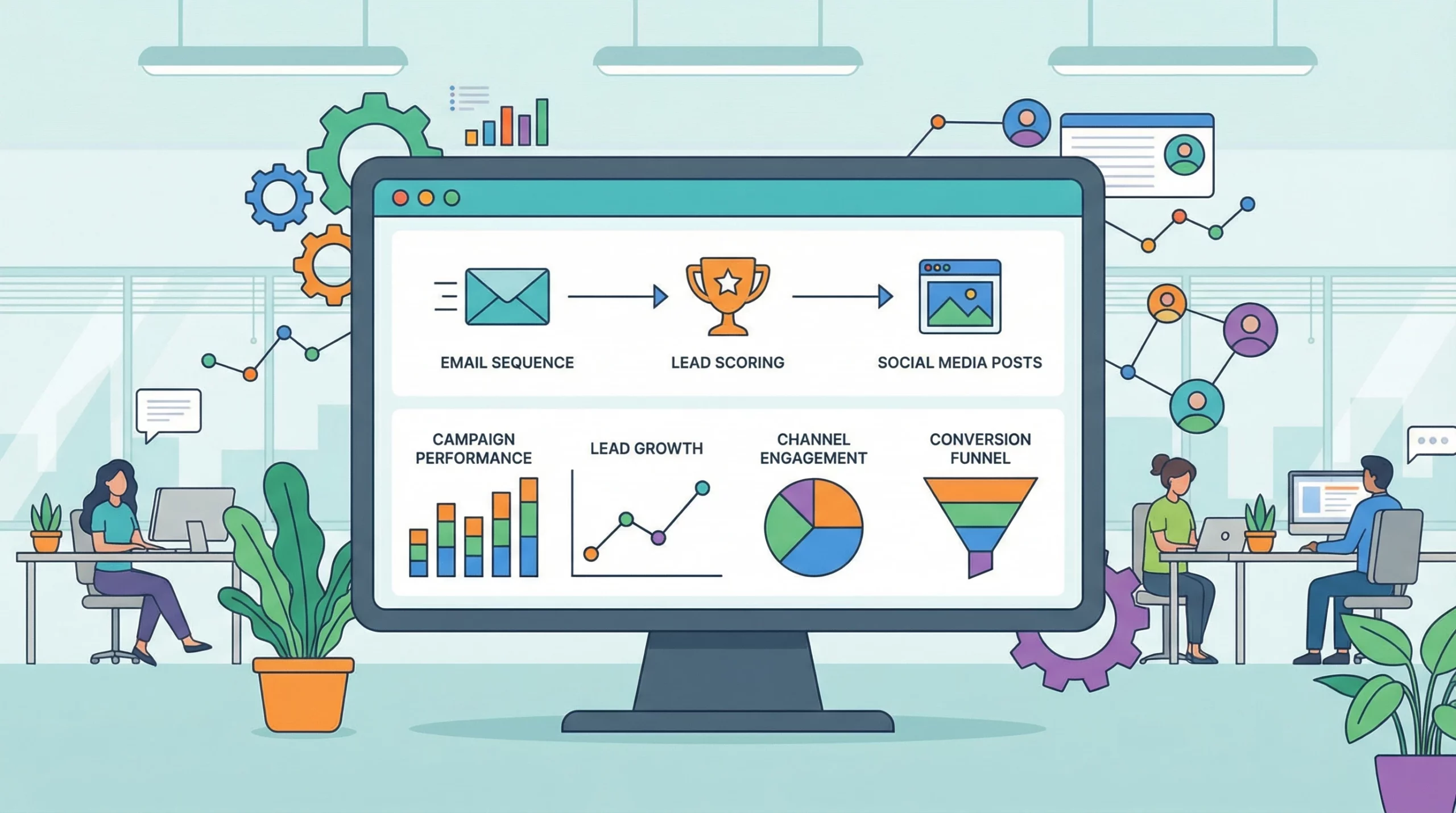
- Email Campaign Automation: Set up autoresponders for welcome emails, followups, and abandoned carts. Most SaaS platforms include templated setups to make this easy.
- Lead Scoring and Segmentation: Assign points (like for opening emails or visiting landing pages) so contacts are sorted into relevant lists automatically. This simplifies sending content to the right people at the right time.
- Social Media Scheduling: Draft posts, let the scheduler handle publishing, and review metrics all in a single dashboard. No more flipping between accounts and losing track of timing.
These initial “easy wins” help build confidence. When these flows are set up and running, I move into more advanced campaign sequencing or dig deeper into analytics to spot trends in user behavior, adjusting my efforts for bigger impact.
Things to Think About Before Choosing a Marketing Automation SaaS
Shifting to automation software changes a lot about how your business runs. Before I commit to any tool, I always look closely at these factors:
- Integration: Will this SaaS sync cleanly with my CRM, website, and ecommerce apps? The less manual data entry the better.
- Usability: Do my team members need days of training, or can they jump in right away? A friendly interface saves more time than you’d think.
- Customization: Does the tool let me shape campaigns, templates, and reports our way?
- Scalability: Will the platform handle more contacts, team members, or marketing channels as my business grows?
- Support and Documentation: Are help resources super detailed? Can I get fast support if something breaks?
Integration
Once, I had to switch platforms because my automation setup wouldn’t sync correctly with our CRM. Copying data by hand took forever and led to mistakes. It taught me to always check integration options first to avoid headaches later.
Customization
I prefer tools that let me build unique workflows and branded templates without outside help. Because every business runs a little differently, automation tools should fit your existing style and strategy—not force everyone into one mold. The more flexibility, the better.
Scalability
Plenty of services run fine on small lists or light use, but slow way down if you grow fast. I always check if there are soft or hard limits on subscribers, automation steps, or API calls, so I don’t hit a wall just as things pick up.
Support and Reliability
Strong customer service matters a lot, especially at crunch time. Quick and clear answers reduce stress, while a robust online knowledge base and tutorials help you make the most of advanced features at your own pace.
Focusing on these areas up front saves major frustration down the line and keeps your automation running reliably as you expand.
Some Advanced Ways I Use Marketing Automation SaaS
Once you handle the basics, you can use marketing automation SaaS in more advanced ways to give your results a boost, save additional time, and unlock new possibilities:
- Automated Lead Nurturing: Campaigns update their message automatically based on where a lead is in their buying process, so nobody falls through the cracks.
- Personalized Product Recommendations: The software can pick and display products or content tailored to an individual’s past activity or preferences.
- Multichannel Campaigns: I run email, text, and social outreach from one workflow, so customers have a seamless experience no matter where they interact.
- AB Testing Automation: Good SaaS lets you test subject lines, call-to-action buttons, page layouts, and more, measuring what truly drives results and letting you tweak campaigns quickly.
Because these methods keep repetitive tasks on autopilot, I can spend more time on creative strategy, building authentic relationships, and scaling up what works.
RealWorld Examples of Marketing Automation SaaS in Action
Every day, I see automation SaaS streamlining the marketing process for myself and my clients. Here are a few real-world scenarios:
For an online retailer client, I set up a simple workflow to contact shoppers who abandoned their carts. Instead of manual emails onebyone, the sequence would send timely, friendly reminders, add special discounts, or offer similar product suggestions. Sales conversions improved and the team could spend more energy brainstorming new campaigns, not chasing lost sales.
- Ecommerce: Automate product launches, upsells, and reminders for abandoned carts so customers are nudged to return and finish their purchase automatically.
- Service Businesses: Keep leads engaged by delivering educational content or checkins at set intervals, freeing up your staff for customer calls and quality improvement projects.
- B2B: Set automatic followups after meetings or content downloads, plus use built-in lead scoring so your sales team always knows who’s most interested.
Frequently Asked Questions
Here are some of the most common questions I hear from business owners who are interested in trying automation SaaS for themselves:
Question: When do I know it’s time to pay for SaaS automation?
Answer: If you’re spending more than a couple of hours each week on routine tasks or missing out on sales because you can’t keep up with manual followups, it’s time to automate. Pinpoint the things you’re repeating the most and track down a tool that can make them happen hands-free.
Question: Is automation SaaS just for big businesses?
Answer: Not at all. Many small businesses, consultants, and solopreneurs use automation SaaS to take on tasks they’d otherwise have to hire for. With a range of price points and flexible features, there’s something for every size and stage.
Question: How do I keep from spamming my customers?
Answer: Smart tools help you control message frequency, segment your recipients, and allow customers to set their own preferences. Always review your communication plans and use functions like throttling or smart segmentation to keep your outreach welcome, not overwhelming.
Wrapping Up
Marketing automation SaaS offers practical, realworld advantages for businesses that want to grow and work smarter. My hands-on experience continually shows that with the right tool, you can cut out repetitive chores, communicate more effectively, and hit your goals faster. Whether you’re freelancing, building an online store, or managing a growing team, these solutions make it possible to scale up efficiently without sacrificing your human touch. Careful selection, investing in a solid paid plan, and being willing to experiment are really the only things you need to kick things off in automation. If you weigh your options carefully and stay open to learning, the results can completely change how you do business.
Hi this type of smartflow software looks great. I am looking for something that will do the following for my business, and I wonder which would be the best software to use for this?
Email campaigns, Lead nurturing and scoring, Social media posting, Analytics and reporting, CRM integrations and Personalized messaging. Is there a solution that offers all of this?
Hi Michel, you are in the right place! Smart flow software is essential for scaling. If you are just starting your search, I recommend listing out the specific repetitive tasks you hate doing the most (like email follow-ups or data entry) and picking a tool that solves those first. Let me know if you need a specific recommendation for your niche!
This was a really grounded, practical breakdown of marketing automation SaaS. I appreciated how you balanced the big-picture benefits with real-life moments—especially the example of losing a weekend to a missing workflow feature on a free plan. That kind of experience is exactly what pushes people from “I’ll figure it out manually” into realizing how valuable paid automation can be. The way you explained automation as something that frees creative and strategic energy rather than replacing it really landed for me, and I also liked how clearly you laid out the progression from simple automations to more advanced, multi-channel workflows.
I’m curious—when you’re evaluating a new platform now, which factor usually becomes the dealbreaker first: integrations, usability, or scalability? And have you noticed a point where automation starts feeling less like a productivity tool and more like an essential part of how the business operates? I’d also love to know if there’s one automation you’ve set up that delivered a bigger return than you expected, especially for lead nurturing or abandoned cart flows.
Thank you, Iris! I really tried to cut through the buzzwords and focus on the practical ROI. The biggest advantage of marketing automation SaaS isn’t just the ‘speed’—it is the consistency. Knowing that every lead gets the exact same high-quality follow-up sequence without you lifting a finger is a game-changer for growing a business.
I’ve found marketing automation can be a bit intimidating if you’ve never used it before. One thing that made it click for me when I first started was using a template as my foundation instead of trying to build something from scratch. Most platforms come with pre-built workflows you can tweak, which means you don’t have to reinvent every step of a campaign or puzzle out your first automation all on your own.
Starting with a template gave me confidence, helped me understand how triggers and actions work in practice, and made it infinitely easier to customize the flow to fit my needs than staring at a blank builder screen. It’s like having a map when you’re exploring somewhere new, which is way less overwhelming and way more likely you’ll stick with it.
Do the SaaS you listed come with templates?
AlohaMelani, this is such great advice! You are totally right—staring at a blank builder screen is the quickest way to get ‘analysis paralysis.’ To answer your question: Yes, absolutely! Every single tool I listed in this article comes with a library of pre-built templates (ActiveCampaign calls them ‘Recipes’). It makes getting started so much faster. Thanks for sharing that tip!